Posts

Showing posts with the label Dota tool

Auct Hotkeys Tool v2.8d (AHT v2.8d)

Image
Name: AucT Hotkeys Tool (AHT) - Author: AucT AucT Hotkeys Tool - is all-in-one autohotkey based program that enables you to customize your keys, which is usefull for inventory, messages, customkeys and other needed stuff in WarCraft III and Dota. FeaturesProfile orginizing Profile orginizing Shift+ support - Shift orders will work Chat-free - doesn't conflict with chat Scroll Indicator - indicates script status (changable) Free - no payment nor ads Small - the tool size is less 250Kb Fast - the hotkeys are setted as far as possible Furious - usese a little memory All-in-one - includes lots of functions Fast Start 1. Download AHT 2. Extract archive 3. Run AHT.exe 4. Enjoy Download:  W3xmap.com AHT v2.8d.zip

Dota ToolKit 3.3c (DTK works 6.75)

Image
I bring to you the "Dota Tool Kit v3.3c" by crisgon (Work in Dota v6.75) Run as a administrator if you are having troubles. FEATURES: Remap: -Inventory -Mouse Wheel -Skills , Selfcast and Autocast CustomKeys: -A quick and easy customkey generator (remember to check "Use customkeys" box) Guide: -An easy and quick guide to some heroes (will add them constantly) Quick: -Send messages -Quick launch -Some configurations for wc3 (widescreen adjustment, improve of fps , wc3 path , healthbars) -Run wc3 on window with mouse capturer -A quick explanation of my tool features Download:   http://www.mediafire.com/?ygtuccee60oechc

DotA Replay Manager 3.02c

Image
DotA Replay Manager is a tool for browsing Warcraft III replays with additional features for parsing DotA replays. I've been developing it for over 3 years now and it is currently one of the most powerful parsers around. (Creator: d07.RiV) Features * Explorer-like replay browser (tree view+list fiew) with functions for copy/paste/drag-and-drop, delete/rename and creating folders. * Organize replays by folder or by date * Auto-copying new replays (from LastReplay.w3g) and batch copying existing replays * Replay search with a lot of options like game name, length, map version, player names and heroes * Viewing replays directly from internet (if a URL is supplied) * Displays a list of replays with statistics for player or hero   * DotA data is fully loaded from the map, so when a new version of DotA is released the program will automatically read the new data * Displays extended game information and list of players with score, lane, item build * Colored chat log with...

Garena auto join 5.0

Image
hbm Auto Joiner Garena  is a support  program  for Garena with  features  like:  Auto Join (Click Auto), Auto Tunnel  and  Auto Open  . This version support Warcraft Hot-Key Auto Join: Garena automatically join the room without waiting 5 seconds.  You can minimize Garena and do their work. Automatic Tunnel: Automatic tunnel all players in the room while you are playing games or doing other work. Auto Trace: Automatically into the room of a friend.  You can minimize Garena and do their work. Automatic detection: Automatic detection of Garena offset so that Auto-Joiner can patch all version of Garena. Auto Run: Automatically run other programs with Auto-Joiner. Automatic Updates : Auto update Auto-Joiner to the latest version. Download:  Garena auto join 5.2.1 http://www.mediafire.com/?ywvyv87a33c0l5d

Auct Hotkeys Tool v2.8c (AHT v2.8c)

Image
AucT Hotkeys Tool (AHT) - is all-in-one autohotkey based program that enables you to customize your keys, which is usefull for inventory, messages, customkeys and other needed stuff in WarCraft III and Dota. FeaturesProfile orginizing Shift+ support - Shift orders will work Chat-free - doesn't conflict with chat Scroll Indicator - indicates script status (changable) Free - no payment nor ads Small - the tool size is less 250Kb Fast - the hotkeys are setted as far as possible Furious - usese a little memory All-in-one - includes lots of functions Fast Start 1. Download AHT 2. Extract archive 3. Run AHT.exe 4. Enjoy Download:  Auct Hotkeys Tool 2.8c W3xmap.com AHT v2.8c.zip  (240 KB)

Warkey 6.6 english

Image
The warkey++ 6.6 EN doesn't effect the chat system (will automatically disable warkey when typing) and it is easy to use. Warkey++ is suit to every gaming platform (Garena, Battle.net). Warkey++ is suit to professional match. Hi guys. This tool helps you to edit the key of Numpad. (WarCraft3 Change HotKey) WarKey++ Yours WarCraft3 Hotkey Helper Features:   1.This program supports the latest War3 1.26patch. 2.Active/Disable Enemy/Ally HP bars 3.Macro hotkey 4.Quick Message 5.Very simple and nice interface. Strong function. WarKey++ 6.6 update: 1. With synchronization, update compatible more keys, with the support of Warcraft 1.26 (New) 2. Modified some of the details of the problem, and prompted some of the features description. (New) 3. Support warcraft 1.26 - fix How to use:  Download and open file  Read me.txt Download:  Warkey++ 6.6 EN W3xmap.com WarKey66_EN.zip  (52.4 KB)

WarDota2

Image
WarDota2 by Rena!ssance (Official) We update everytime Update 01/05/2012   Terrain Local Files Download link (mediafire 28mb) Pudge&WR Models with Responces by shintetsu100.rar Update 06/06/2012 -Added Pugna -Added Dire's Tower (requires WarDota2 Custom Map!) -Radiant and Dire Tower Custom Missile! -Added Bad_Ancient (requires WarDota2 Custom Map!) -Added Roshan (requires WarDota2 Custom Map!) -Added Phantom Lancer (requires WarDota2 Custom Map!) *WarDota2 local files will be release soon! *WarDota2 Tools will be delayed, but i promise i will make it! *Credits Trolboy for the Screetshop(Shopkeeper)! Mostly Asked Questions! Q: I cant Find/Use the towers, Roshan, Etc... Can you help me? A: Yes! Just follow these steps to find the path of those models. Download my Map(you can fount it on my thread "wardota2")... Open the map using winMpq/MpqMaster/or any thing your are using... Extract "Units\UnitUI.slk"... You can find the paths f...

AucT Hotkeys Tool v2.8b

Image
AucT Hotkeys Tool- is all-in-one autohotkey based program that enables you to customize your keys, which is usefull for inventory, messages, customkeys and other needed stuff in WarCraft III and Dota. FeaturesProfile orginizing Shift+ support - Shift orders will work Chat-free - doesn't conflict with chat Scroll Indicator - indicates script status (changable) Free - no payment nor ads Small - the tool size is less 250Kb Fast - the hotkeys are setted as far as possible Furious - usese a little memory All-in-one - includes lots of functions Fast Start 1. Download AHT 2. Extract archive 3. Run AHT.exe 4. Enjoy Update new version:  Auct Hotkeys Tool v2.8c (AHT v2.8c)

DotA 1.5 AI v1.1

Image
Hi guys. After receiving many feedbacks about the LAN bugs, I decided to move icon files to Local files, which mean the icons is now outside the map and that will make the map smaller. In addition, many Dota 2 heroes will be released in future so there can't be enough space if I continue import icons into the map. Here is the link, make sure you read the instruction carefully 5/5/2012: DotA 1.5 AI v1.1   ( by 9enial ) *INSTRUCTION: How to make it working correctly. 1. After download file "DotA 1.5 AI.rar", you extract it and you will see 2 folders: Mapsand ReplaceableTextures. 2. Copy these 2 folders into wc3 directory, if you copy the right folders, you will see a dialog like this: Choose "Yes to all" 3. Download Dota 2 models pack at the attachment below Then extract the .rar file and you will see 2 folders: Abilities and Units. Copy these folders into wc3 directory. (like step 2) 4. Make sure you have enabled Local files on wc3. If you haven't, run ...

Warcraft 3 themes

Image
Here comes a set 46 Warcraft 3 Modded Themes (by K-4-iN) which can make your Warcraft 3 stylish by customizing the old background animation and buttons texture, it doesn't change anything inside the game.   These themes are available for Normal & Widescreen resolutions and comes with 7different color chains. Check out the Warcraft 3 Themes preview & installation guide. Some Screenshots: Warcraft 3 Mods/Themes Installation Guide: Step 1, Get the Files • Download the Warcraft 3 Modded Themes from the links above and extract the compressed file to any folder using WinRAR. Step 2, Select your theme • Select your favorite Warcraft 3 theme from "Themes" folder, you will find screenshots there of every theme along with their installation files. Step 3, Install the Theme • Now, Run "CUSTOMBG.reg" and copy the "Textures" and "UI" folder to your Warcraft 3 InstallationDirectory. Step 4: Enjoy • Your Warcraft ...

Dota theme manager v5

Image
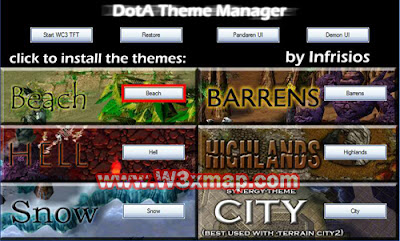
The DotA Theme Manager - in short: DTM - allows you to change the look of the terrain while still allowing you to play with people who do not use the DotA ThemeManager - on battle.net, garena, hamachi, just everywhere. Multiple themes are available: Beach, Barrens, Snow, Hell, City and Highlands, all of them having a unique design! Many of you will wonder how it works...well, it is simple: The DTM exchanges textures of terrain, trees and doodads in the MPQ files - basically the storing files for WC3. The process is easily reversible, not harming WC3 at all, and it causes no problems in the interaction with other players who do not use the DTM. A tiny negative point is that is also changes the textures for other maps which might look a bit bad, but if you restore it to original it works again, so it is never problematic. Installation Guide 1. Download the newest version of the DotA Theme Manager 2. Unpack the file IN your warcraft folder - in most cases C:\Program Files\...

War3HK Tool 6.3

Image
War3HK Tool 6.3 - WarCraft III HotKey Tool - Support DotA LOD, OMG, Dota imba Version 6.3 ONLY supports warcraft III patch 1.23 -> 1.26 Here are funtions my tool supporting: -/iTem Remap support Alt + Q,A,S,....  support Funtion Key Ex: F1,F2,F3,......  Support Shift Queue for WheelUp,WheelDown,WeelMouse if you check Click Left  Mouse box  Note: -/ To use Tab Button You can open setting.ini and edit item7=Tab Open my tool again you will see iTem slot numpad 7 will use tab key -/Space Support Shift Queue if you check Click Left Mouse box  -/AutoCast & SelfCast Enter HotKey skill of hero then check AutoCast or SelfCast  EX: Viper enter key C to Skill 1 HotKey then check AutoCast, in Game Double Press  key C  OmniKnight need set hotkey R then check SelfCast,in Game Double Press key R  -/Skill 5 and Skill 6 hotkey: mode Invoker : move mouse to the icon then click left mouse (like normal skill)  mode Morphi...

Dota ToolKit 3.3c (DTK works 6.74)

Image
I bring to you the "Dota Tool Kit v3.3c" by crisgon (Work in Dota v6.74) Run as a administrator if you are having troubles. FEATURES: Remap: -Inventory -Mouse Wheel -Skills , Selfcast and Autocast CustomKeys: -A quick and easy customkey generator (remember to check "Use customkeys" box) Guide: -An easy and quick guide to some heroes (will add them constantly) Quick: -Send messages -Quick launch -Some configurations for wc3 (widescreen adjustment, improve of fps , wc3 path , healthbars) -Run wc3 on window with mouse capturer -A quick explanation of my tool features Download:   http://www.mediafire.com/?cd3q44gckcvpgkj

VAPHotKey 2.0 - Hot key dota

Image
Features: Hotkey - Inventory switch hotkey. Change key - moving the users skill, skill for dota LOD, OMG. Invoker Skill - create and use invoker skills quickly. Support the Space key and some other special keys. Chat normal when using hotkey.         Change Key                      Invoker Skill     Link Download: VAPHotKey 2.0 - Hotkey dota VAPHotKey 2.0 - Hot key dota W3xmap.com_VAPHotKey2.0.zip  (423 KB)

PHNScript v5.0 - Hotkey dota

Image
Features: - Hotkeys only set when Warcraft III is on, auto detect chat and lobby suspend. - Doesn't affect shopping keys with "Replace real keys" disabled. - Invoker & Meepo hotkeys. - Quick messaging hotkeys. - Key remapping. - Inventory hotkeys. - Auto-cast hotkeys. - Crow fast transfer hotkeys. - And more ... PS: - The script is a combination from many sources, many thanks to AucT with his AHT, Warkey++ for the idea of "fully replace keys", Crisgon DTK for the ideas of Invoker & Meepo. - The script is for non-commercial purpose, no ads included, I don't have any profit from this. I just want to share a tool with features that many hotkeys developers don't dare to add. Please feel free to use, no hostile or harsh comment is allowed, ok? Download:   PHNScript v5.0 - Hotkey dota